Aghiles Ait Messaoud is a PhD, Research Software Engineer working at iExec. He specializes in distributed systems and confidential computing. He currently works at improving the trustworthiness of iExec platform by leveraging TEE capabilities. You can contact him at aghiles.ait-messaoud@iex.ec for any question regarding the article.
Part 1 of this series established the foundation of the Nox chain of trust: the boot-time verification that prevents a Confidential Virtual Machine (CVM) from obtaining any secret unless it has booted a known operating-system image and a known application stack on attested Intel TDX hardware. That guarantee, however, is enforced internally by the platform at boot time; on its own, it gives an end user or an external auditor no direct way to check, at a later moment, that a live Nox service is still the exact workload that was attested.
This document is the second part of the series and addresses that gap: runtime attestation, the ability for any party to verify, at any point during a CVM's lifetime, that a given Nox component is genuinely running the expected code inside a genuine Intel TDX Trust Domain (TD). We describe (i) how a fresh TDX quote is requested from a running CVM and what it contains; (ii) the components deployed around the TDX fleet to discover the running CVMs and expose their quotes; (iii) the end-to-end sequence and the user-facing interface that surface this evidence; and (iv) the step-by-step protocol by which a quote is verified, from its signature down to the docker-compose actually executed.
It builds directly on the TEE foundation described in Part 1 and deliberately limits its scope to runtime attestation as surfaced through the Runtime Attestation UI. The remaining links of the chain of trust, source-code binding and on-chain governance of the authorized measurements, are treated in later parts.
The remainder of this document is organised as follows. In Background, we recall what runtime attestation is, how a TDX quote is structured, and the three quote fields Nox relies on. In Architectural deployment, we describe the components deployed around the TDX servers and the data they exchange. In Reference environment, we pin the versions of the components this article is based on. In Sequence Diagram, we trace the end-to-end flow by which the UI discovers the running CVMs and attests them. In User Interface Presentation, we present the interface and its three levels of attestation. In Attestation steps of a Nox component, we detail the verification protocol applied to a single CVM. Finally, in Future Work, we outline the planned improvements: image provenance, user-supplied challenges, and additional quote verifiers.
In this section, we review the concepts this document builds on: what runtime attestation is, how a TDX quote is structured, and the three quote fields Nox relies on, namely report_data, the RTMRs, and their associated event logs.
Runtime attestation is the mechanism that lets any remote party verify, on demand and at any point during a CVM's lifetime, that a Nox component is genuinely running inside a real Intel TDX Trust Domain (TD) with the expected code and configuration. Where boot-time attestation (see Part 1) establishes the chain of trust from the hardware up to dstack-OS, runtime attestation exposes that trust to external verifiers through a simple challenge-response protocol.
A TDX quote is a cryptographically signed structure produced by the platform's Quoting Enclave. It carries the evidence a verifier needs to trust a TD and is signed with an Intel-provisioned attestation key, so that anyone can validate its authenticity by walking the certificate chain back to Intel's root of trust. The three fields Nox relies on for runtime attestation (report_data, the RTMRs, and their associated event logs) are detailed below.
report_data is a 64-byte field whose content is entirely chosen by the workload. TDX copies it verbatim into the signed quote, which lets an application bind arbitrary data to the hardware attestation. Common uses are:
In Nox, the UI generates a random challenge and expects to find exactly that value in the quote's report_data.
Runtime Measurement Registers (RTMRs) are the TDX equivalent of TPM PCRs: append-only registers that cannot be written directly, only extended through a hash chain. A TD exposes four of them, and dstack assigns each a well-defined role:
The initial memory contents and configuration of the TD are captured separately in MRTD. During verification, RTMR0–RTMR2 (together with MRTD) attest the integrity of the boot chain, while RTMR3 attests that the expected application code and configuration are running. In Nox we focus on RTMR3, since it ties the quote to the specific Nox component and its docker-compose.
An RTMR value is an opaque hash: it attests whether the expected measurements were folded in, but not what they were. The event log is the human-readable record of the individual measurement events that were extended into an RTMR (in practice, RTMR3). Each event is a key-value measurement such as app-id, compose-hash, instance-id, or key-provider, and every event is folded into the register with the extension formula:
RTMR3_new = SHA384(RTMR3_old || SHA384(event_log))
A verifier replays the event log through this formula and compares the recomputed register to the rt_mr3 value inside the signed quote. If they match, the individual event values, notably os_image_hash and compose_hash, can be trusted as faithful representations of the OS image and docker-compose actually executed by the CVM.
In this section, we describe the components deployed around the TDX servers to make the Runtime Attestation UI work, and we illustrate the shape of the data they exchange.
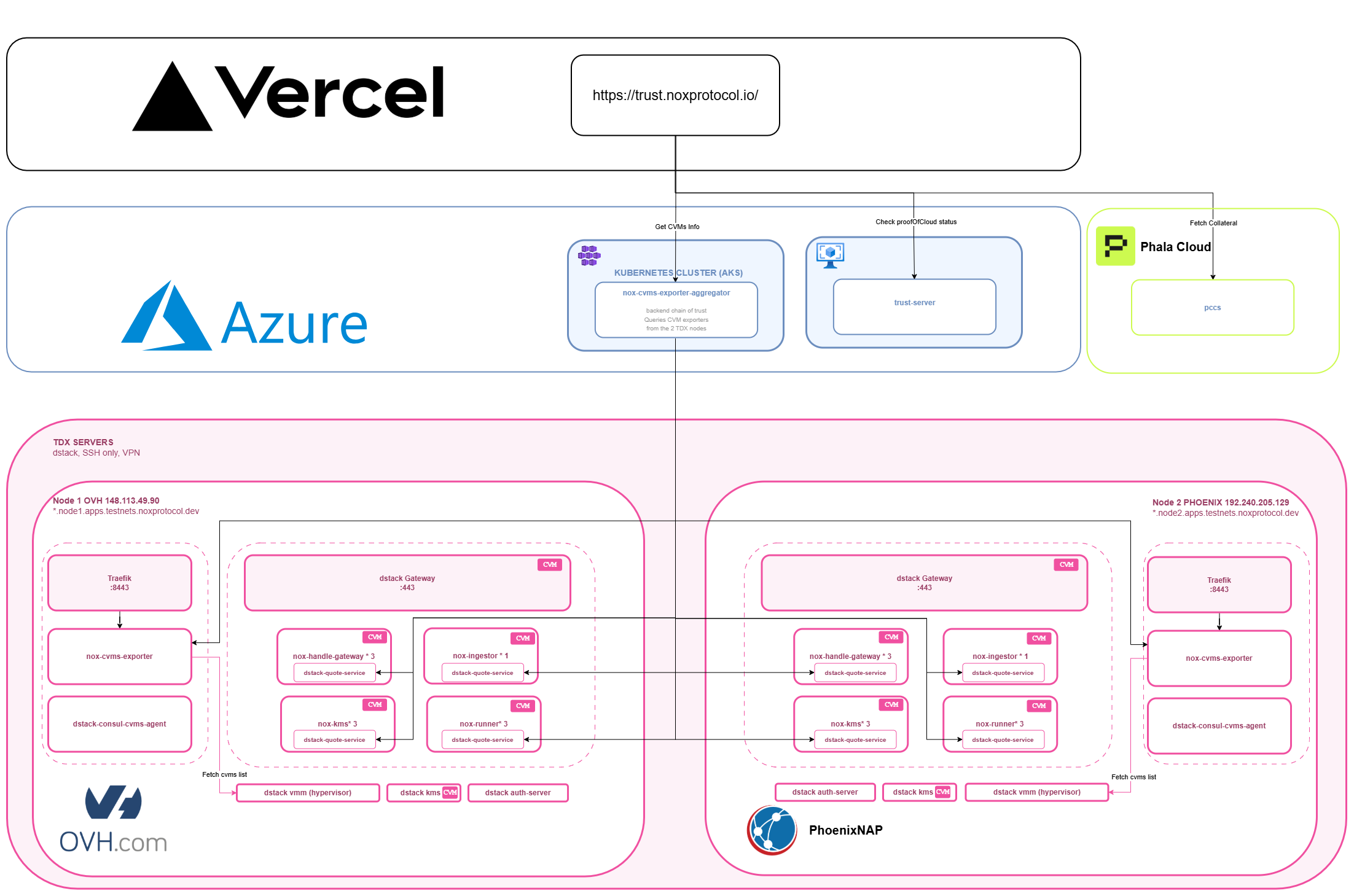
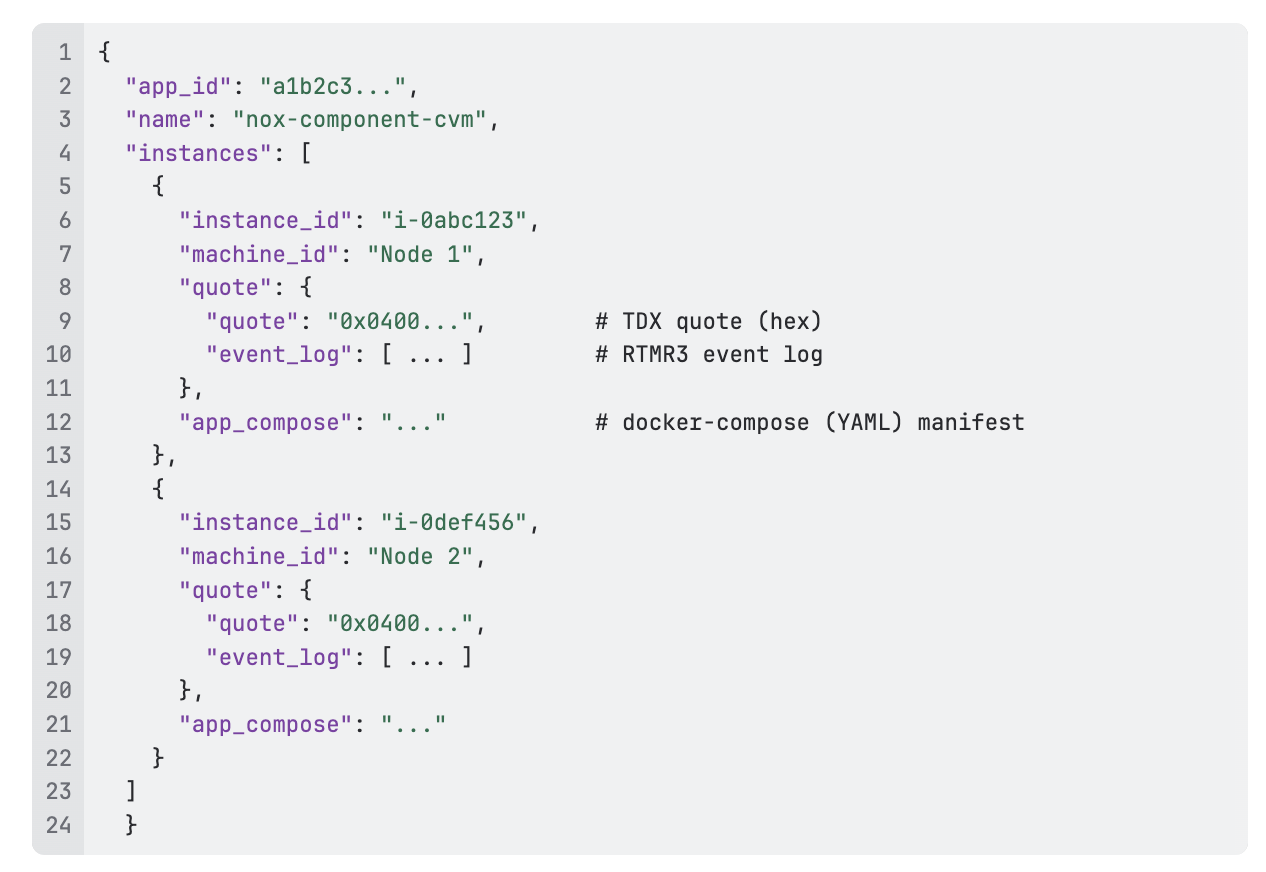
To make the Runtime Attestation UI work, five main components collaborate:
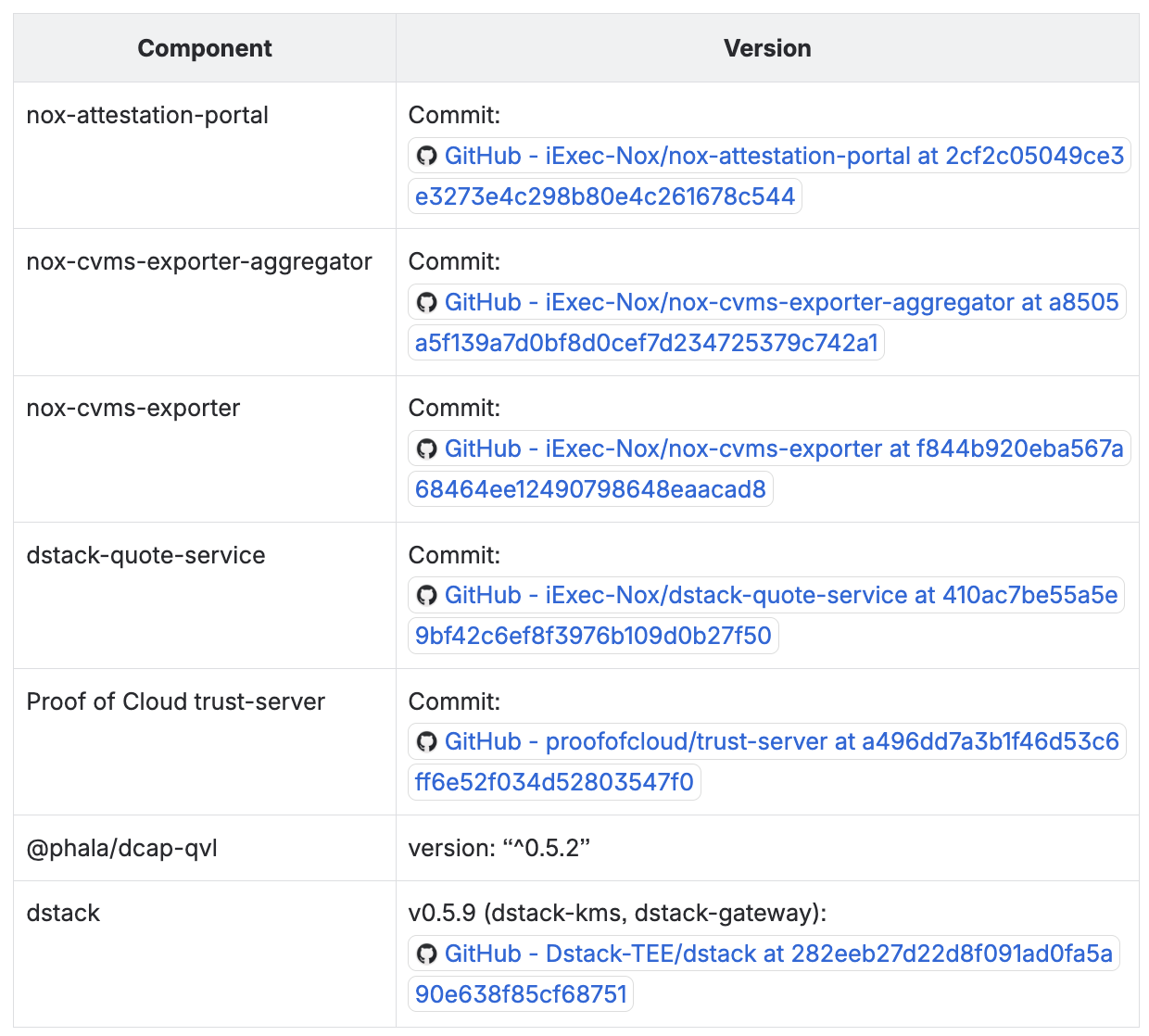
In this section, we pin down the exact versions of the components involved in the Runtime Attestation UI, so that the behaviour described in the rest of this article can be reproduced and, as these components evolve, compared against a known baseline.
In this section, we trace the end-to-end sequence by which the Runtime Attestation UI discovers the running CVMs and attests them, from opening the portal to displaying the result.
.png)
This diagram describes how the Runtime Attestation UI discovers the Confidential VMs (CVMs) running across the TDX fleet and attests them.
In this section, we present the Runtime Attestation UI and the three levels of attestation it exposes to the user.
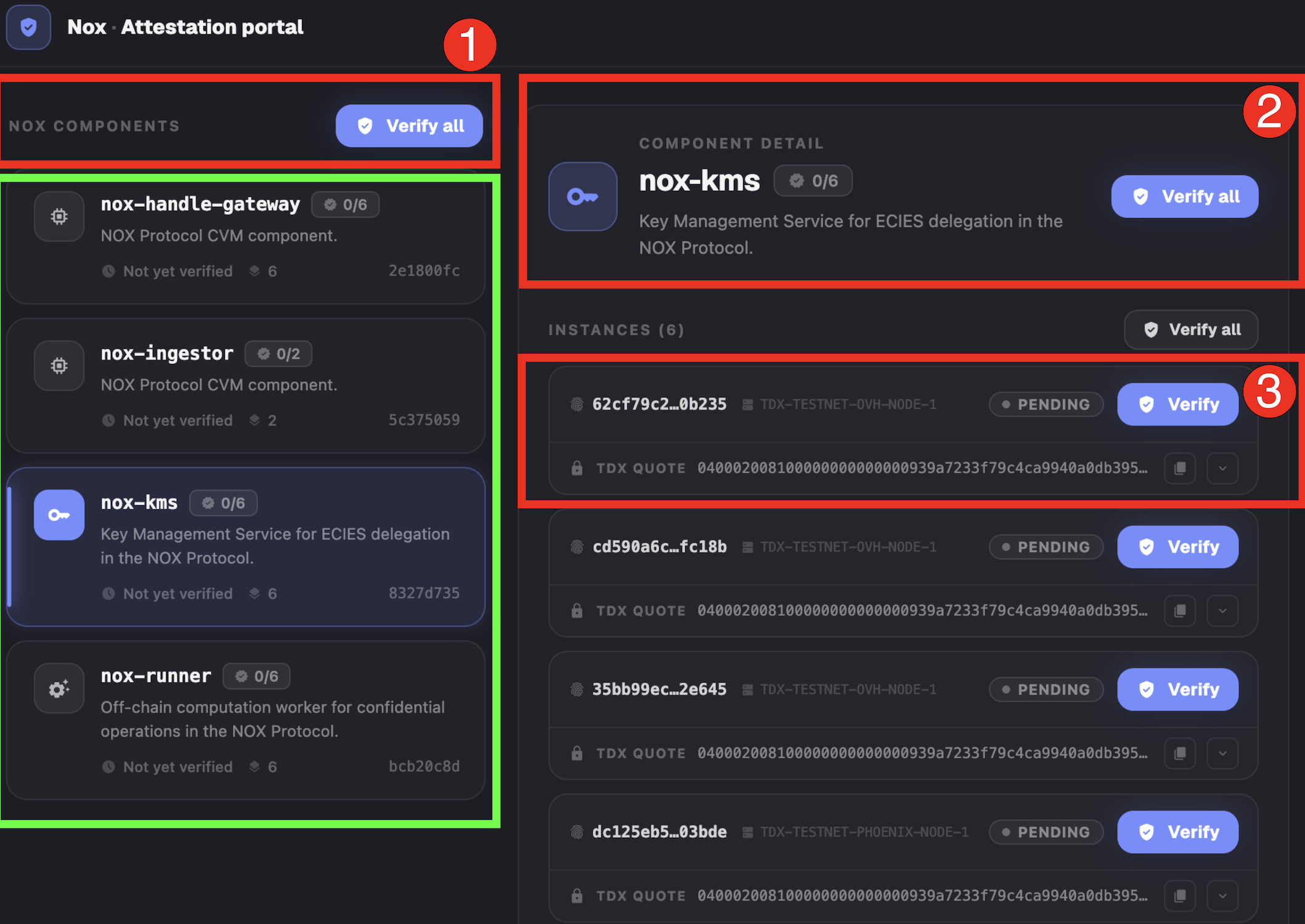
The screenshot above shows the Runtime Attestation UI. On load, the left-hand panel lists the Nox components running on the testnet TDX machines, each annotated with its number of replicas (e.g., 6 for nox-kms). The interface offers three levels of Nox component attestation:
In this section, we detail the step-by-step verification protocol applied to a single Nox component CVM, and we describe what the UI displays once every check has passed.
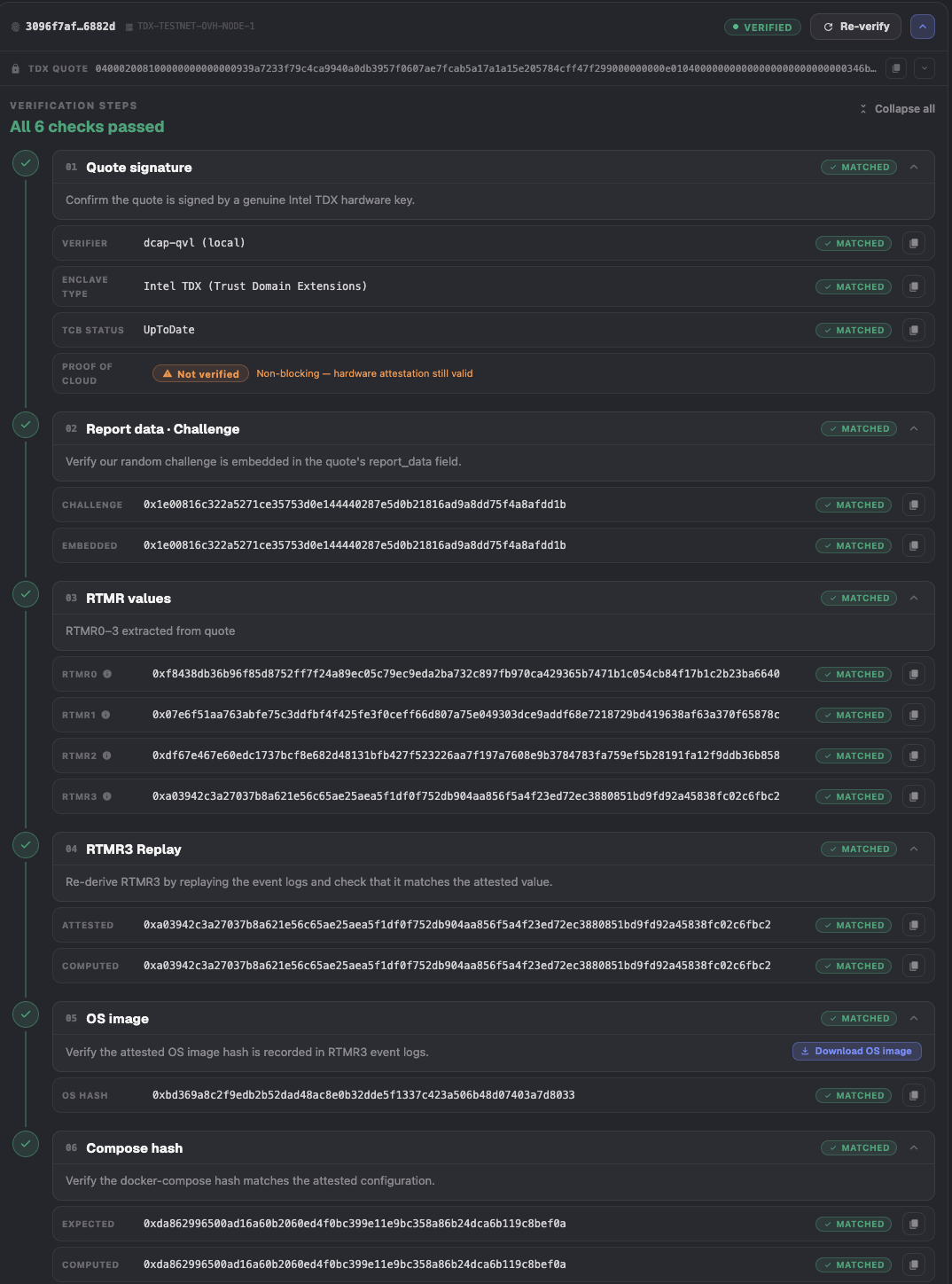
The verification protocol applied to a Nox component CVM proceeds as follows:
Once these verification steps are performed, the docker-compose corresponding to the compose-hash of the attested CVM is displayed as shown in the image below.
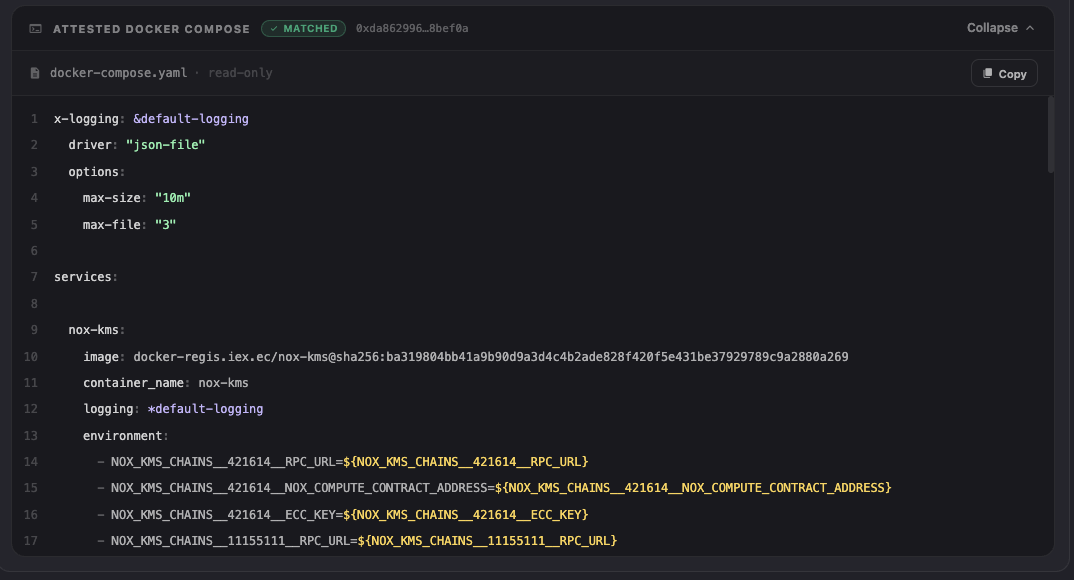
The docker-compose of the CVM encompasses three services:
In this section, we outline the planned improvements to the attestation flow: image provenance, user-supplied challenges, and additional quote verifiers.
As of now, the attestation stops when we display the docker compose that lists the images executed in the attested CVM. A next step is to leverage Sigstore infrastructure to sign the GitHub Actions workflow that generated each image, during its build, and publish the SLSA (Supply-chain Levels for Software Artifacts) attestation identified by the sha256 checksum of the image (subject-name) in GitHub and the docker registry of the image. A Rekor entry will also naturally be pushed. By doing so, we will be able to extend the verification steps mentioned in this article by attesting the provenance of each Nox image (i.e., build workflow and GitHub repo commit).
Currently, to test the freshness of a quote, we use an auto-generated challenge that is transmitted from the UI to the aggregator as a query parameter, which then relays it to each quote-service. We will strengthen this process by allowing UI users to enter their own challenge to get an additional level of trust in the freshness of the quote.
Currently, we use Phala qvl as the sole verification method to check the Intel signature and certificate chain of a quote. We will add additional verification methods, either as backups or as mandatory checks if available, to improve trust toward the verification result. The potential verifiers to add are iExec-hosted dstack-verifier and Intel Trust Authority.